
robonomics.app, feature by feature: what the app does today and what we fixed
robonomics.app is the front door to the Robonomics cloud for a smart home. We went through every screen as a new user would, fixed what was broken, and wrote down what still needs work. EnsRationis [Robonomics Software Architect]
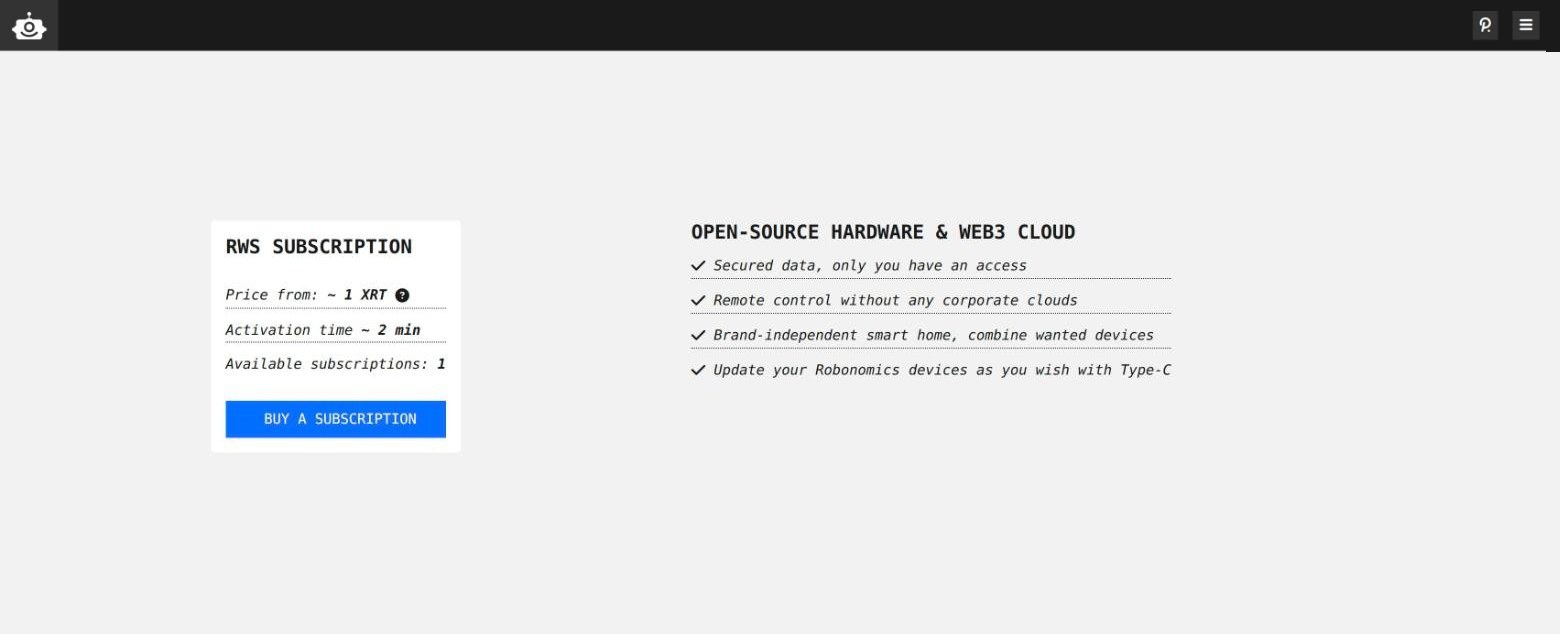
robonomics.app is where a smart home meets the Robonomics cloud. You get a subscription there, connect your Home Assistant to it, add the people who share the house, and then control your devices from anywhere. The commands and readings travel without a corporate cloud in the middle.
This week we went through every screen the way a new user would. Here is what each one does, what we fixed along the way, and what is still on the list.
The subscription
The home page answers three questions: how much a subscription costs (about 1 XRT), how long activation takes (about two minutes), and how many subscriptions are available right now. One button leads to the purchase.
The purchase page asks you to connect a Polkadot wallet, shows the chosen network and the price, and sends one transaction. A subscription is time-limited and renewable from the same page.
Adding a setup
A “setup” is your home as the app sees it: a subscription plus the accounts tied to it. There are three ways to add one:
- By the owner’s address. Paste it, and the app finds the subscription in the cloud and shows how long it is valid — even if it has already expired.
- From a wallet extension. Pick the owner account instead of typing it.
- From a backup file that you exported earlier.
The list of setups is kept in your own browser. Removing a setup from the app removes it from that list only; nothing changes in the cloud.
Your setup
The setup page is the control room for the subscription:
- Active until — the expiry date, highlighted in red once it has passed.
- Owner — the account that holds the subscription.
- Controller — the account your Home Assistant uses to write to the cloud. It is created during the Home Assistant integration setup and pasted here.
- Users — the people who may control the home. Each one gets access under the same subscription; there is no per-person fee.
- Subscription backup — exports all of the above to a file, so moving to a new browser or device takes one upload.
Devices and control
This is the page people come for: your Home Assistant dashboard, opened from any browser. The app connects to your Home Assistant directly, peer to peer, and falls back to a relay when a direct link is impossible. Everything is encrypted, and only the users you added can read it.
To open the panel, you choose a user and unlock that user’s key. The key stays in the browser; “keep me signed in” is offered for trusted devices only.
Sensors and digital twins
- Altruist — charts of what a sensor has recorded in the cloud: particulate matter, noise, temperature, humidity and pressure, with the raw records one click away.
- Energy monitor — the same for a smart meter.
- Digital twin — a named map of the accounts behind your devices, kept in the cloud and editable by its owner.
What we fixed this week
Walking through the app turned up problems a visitor would hit before ever buying anything:
- The “buy XRT” links pointed to the old token. Both Uniswap links led to the R&D-stage XRT that is now being migrated. They now point to production XRT. Solarbeam and Basilisk are gone (one is unreachable, the other returns an error), and so is Kraken, where XRT is no longer traded.
- A mistyped address sent people to a dead site. Any unknown page used to redirect to an old domain that no longer opens. The app now shows its own “page not found” with a way back.
- The privacy policy was missing. It is now linked from the footer.
- Link previews and the browser tab icon were broken. Shared links now come with a picture, and the tab shows the Robonomics icon.
- The build version in the browser console was always empty. That made bug reports harder to match to a release; it is fixed.
- Sensor pages never finished loading. Since a library update a year ago, the Altruist and energy monitor pages showed the chart only while data was still arriving, then fell back to “Loading” for good. They now draw the chart, and say so plainly when a sensor has no readings or the chain can’t be reached.
- Old pages are gone, and the first load is lighter. Hidden pages from past experiments (an NFT season pass on a test network, a robot-payment demo, an old storage flow) were removed along with their code, and the heavier pages now load only when opened. The first download is more than a quarter smaller.
What comes next
- Saving the controller. Users report that a new controller address is sometimes not saved, and that addresses in Kusama subscriptions can’t be managed. The likely cause is that the app compares addresses as plain text, while the same account looks different in Kusama and Polkadot format.
- Unlock with the wallet. Opening the control panel should not require typing a key phrase into a web page; we want the wallet extension to handle it.
- Switching networks. If you once opened the app with a custom network address, it stays pinned in that browser with no way to reset it. A visible network switch will replace that.
- Terms of sale next to the privacy policy, since the app sells subscriptions.
The app is open source: github.com/airalab/robonomics.app. If something on this list bothers you most, or you found something that isn’t here, open an issue there.
 — EnsRationis, Robonomics Software Architect · @EnsRationis